Platform · Cases
Your cases, checked for you without opening the portal every day.
Add the case number, the court and the type of matter. SoyLic checks the official source twice every business day, tells you which orders are new and emails you. It is not magic: it is what you would do every day, done by SoyLic.
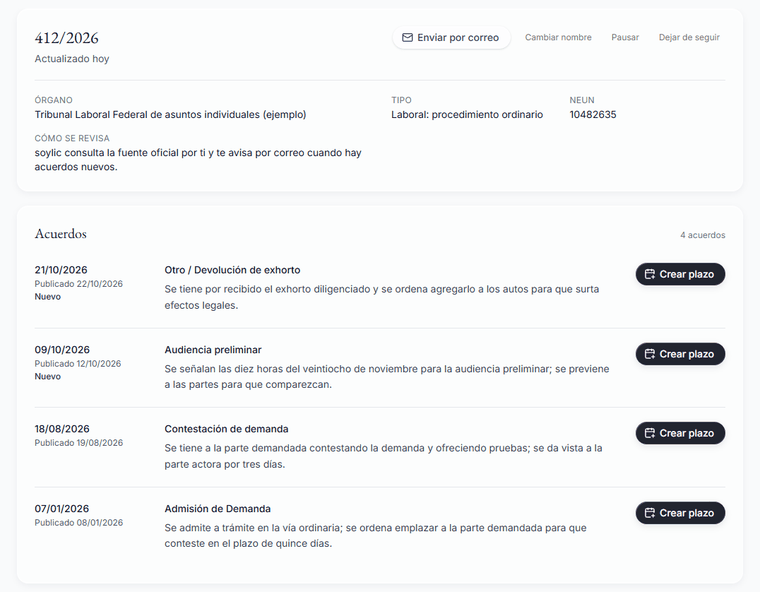
Every order, with its dates
You see the date of the order, the date it was published and its summary, newest first. New ones are marked; if the source corrects an order, you are told that too.
Federal Judiciary
Amparo and federal labor courts. SoyLic opens the official lookup for you, the way a person would, at a measured pace and without bypassing any restriction of the portal.
From order to deadline
Create the deadline from the order: SoyLic proposes the date with the court's own holidays and you confirm it. The order is marked with its deadline.
In your projects and in the chat
If the case is in a Project, its members see it and you can ask the assistant about an order with its text already filled in.
When the source cannot be checked automatically
You paste the result of the official lookup or upload the order as a PDF or Word file, and SoyLic compares it with what it already had. It never says there is nothing new when it could not check.
Email alerts
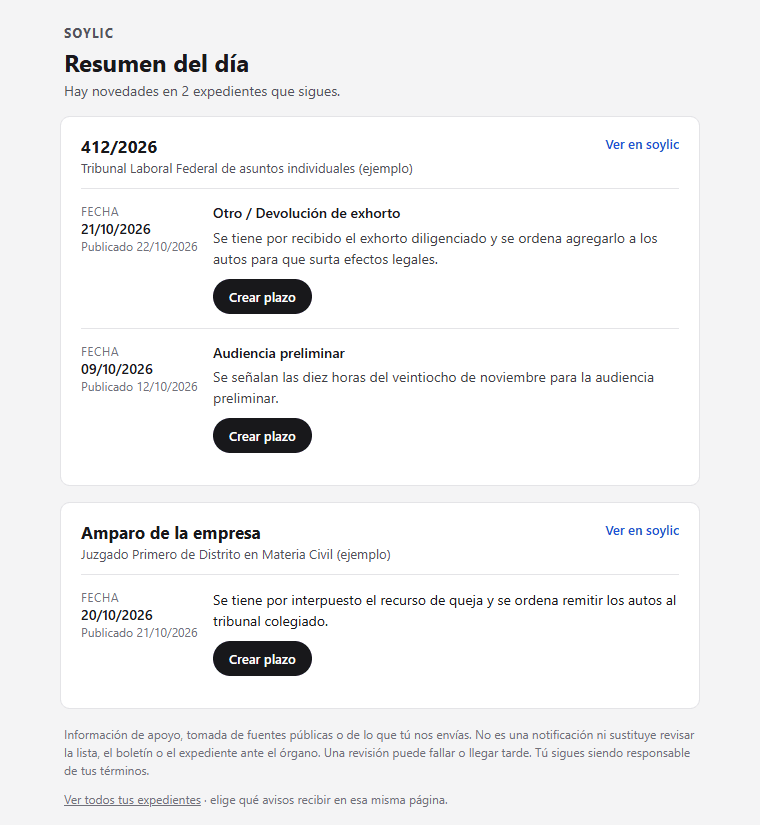
One daily digest per person, with the orders grouped by case. Each one carries its button to create the deadline. You choose whether to receive updates and how much of the order is shown.
Start free. Grow with your team.
Create a free account and try it with your own documents. No card needed. The app is in Spanish.
Create a free account